
Select your current app version for best support
When do I use the Templates page?
ePak Custodians use the Templates page to create and modify Workflow or Document templates The Templates page can be used to
- Create workflow templates to be attached to ePaks on the Compose page.
- Edit an existing workflow template.
- Delete an existing workflow template.
- Select workflow settings like Signing Certificate policy, accessibility, workflow states, signers/reviewers, special instructions, tags etc.
- Create a Document template.
- Edit an existing Document template.
- Delete an existing Document template.
- Choose Document Template settings like accessibility, signing certificate policy, signature tags and map the tags to signers.
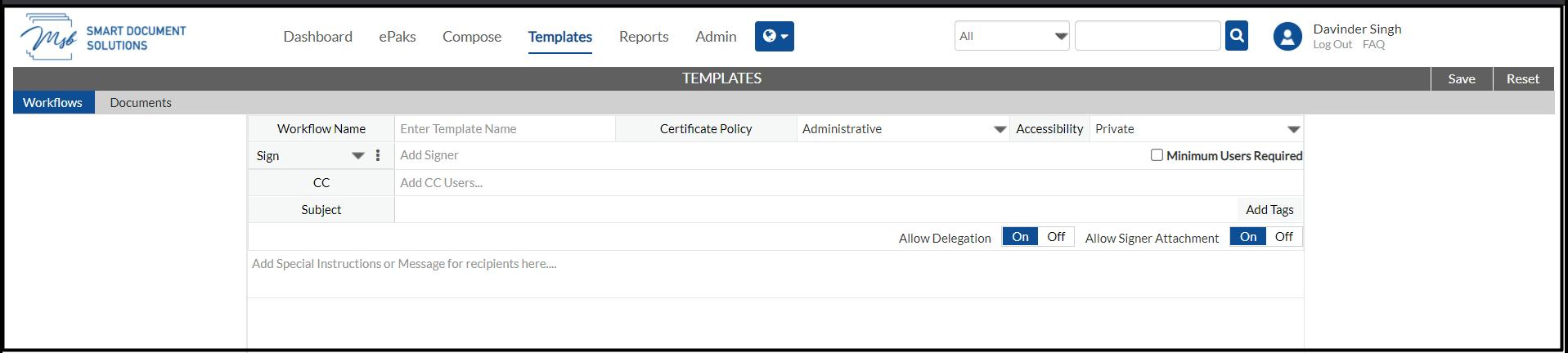
ePak Custodians use the Templates page to create and modify Workflow or Document templates
The Templates page can be used to
-Create workflow templates to be attached to ePaks on the Compose page.
-Edit/Delete an existing workflow template.
-Select workflow settings like Signing Certificate policy, accessibility, workflow states, signers/reviewers, special instructions, tags etc.
-Create/Edit/Delete a Document template.
-Choose Document Template settings like accessibility, signing certificate policy, signature tags and map the tags to signers.

