
Select your current app version for best support
Can I Bulk Sign ePaks that Require Input from me?
If Bulk Signing is enabled on your instance, Signers may choose to bulk sign ePaks. Bulk Signing allows a Signer to sign multiple ePaks in a batch.
To Bulk Sign ePaks:
- Select the ePaks which you wish to Bulk Sign.You may choose a group of ePaks by selecting multiple checkboxes in your Inbox.
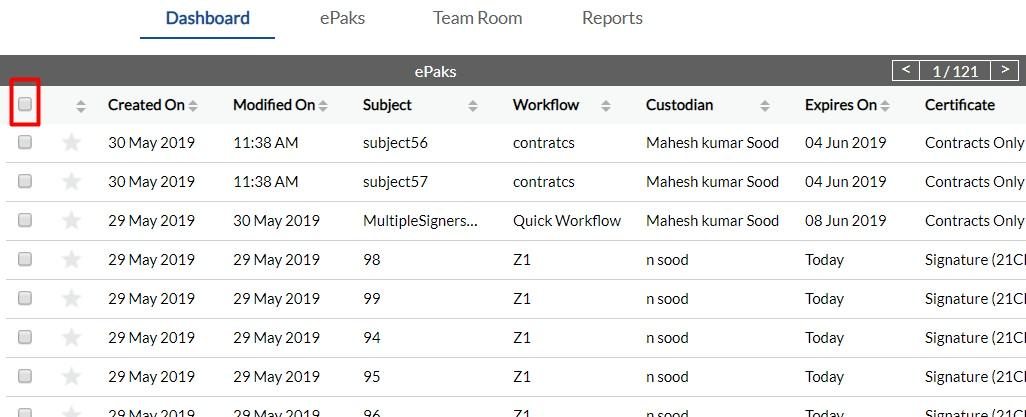
Alternatively, you may choose to select all ePaks in your Inbox by clicking the “Select all…” link at the top of your ePaK list.

- Once you have made your selection of ePaks you wish to sign, then click the Bulk Sign button.It will then initiate the Bulk Signing process.
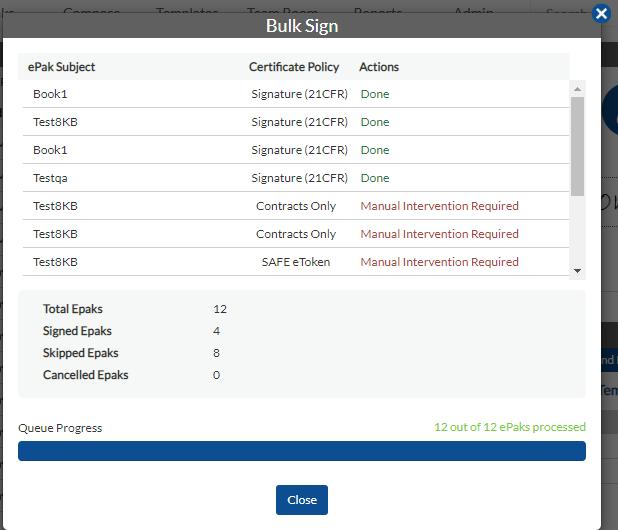
If you select ePaks in your Bulk Signing batch which require input from you, those ePaks will be skipped and will remain in your inbox. ePaks that require your input are ePaks that contain tags such as Signer Text or other tags which cannot be auto populated using data already in your Profile. These ePaks will be noted in the Bulk Signing Summary which is displayed after processing the batch.
If Bulk Signing is enabled on your instance, Signers may choose to bulk sign ePaks and sign multiple ePaks in a batch. To Bulk Sign, Select the ePaks you wish to Bulk Sign. You may choose a group of ePaks by selecting multiple checkboxes in your Inbox. Alternatively, you may choose to select all ePaks in your Inbox by clicking the “Select all…” link at the top of your ePak list. Once you have made your selection of ePaks you wish to sign, then click the Bulk Sign button. It will then initiate the Bulk Signing process.
MSB users can also bulk sign ePaks with a DSC Token by selecting the desired ePaks and clicking on the Bulk Sign option. After selecting the reason and providing their consent, the users will be able to click on Sign to proceed further where they are greeted by another pop-up asking them to fill-in the PIN for their attached DSC Token. After Successfully filling in the PIN, the bulk signing process will begin, and user will be able to see the summary of the bulk sign process. Bulk Sign with DSC Token will only work for ePaks whose documents only have signature fields.

If you select ePaks in your Bulk Signing batch which require input from you, those ePaks will be skipped and will remain in your inbox. ePaks that require your input are ePaks that contain tags such as Signer Text or other tags which cannot be auto populated using data already in your Profile. These ePaks will be noted in the Bulk Signing Summary which is displayed after processing the batch.
