Security & Compliance
November 18th, 2025

Online Document Security & Privacy: Does it matter?

Almost every business sector has been affected by cyber-attacks in one or the other way. Especially IT, BFSI and healthcare sectors suffered a lot due to unprotected data. All this because, online documents are stored by companies on unsecured servers or hard disks.

When the data is made accessible to company employees or external sources, it doubles the chances of hacking. According to Clark School study at the University of Maryland, hackers attack every 39 seconds, on average, 2,244 times a day. Malware attacks such as WannaCry and NotPetya discovered in 2017, took multiple forms and hit all types of companies. Both of these attacks shared similar characteristics and were associated with unsecured data, or an IT flaw, that enabled easy access to the systems.

Therefore, online document security and privacy matter a lot. Ensure that the company which stores your documents has securitized electronic archiving, which also retains its probative value. The importance of securing and archiving data is not just limited to this; there are many other reasons that you need to take your online document security and privacy seriously. Some of these are

  • Secured storage makes documents legally admissible
  • It guarantees that documents cannot be altered
  • Safeguards the documents against cyber-attacks
  • Ensures long term document retention
  • Maintains integrity of massive quantities of documents

The good news for you is, if you are associated with MSB Docs then there is nothing to worry about as we have following practices and security measures in place that ensure your document security:

Servers and networking

MSB Docs software runs its production on contemporary and continuously patched systems along with additional hosting services such as Amazon RDS, S3, and others. This eliminates the chances of data stored on outdated systems.

Storage

All the document related data such as metadata, activity logs, original files, and its versions are stored in different locations and are encrypted at rest with AES-256. This data is only compiled when a request is generated. Thus, enhancing the data security.

Coding and testing practices

The Application Development and Quality Assurance (QA) team of MSB Docs follow strict guidelines to monitor the application continuously and work hard to ensure that it meets the utmost security standards.

Employee access

We have separate rules set for writing software and providing access to employees that limit the chances of data theft. Our team is well instructed to use data for responding to customer support requests.

Isolated environments

All the networks are logically isolated from each other so that QA and Development team can work without breaching the level of access they have for the data.

System monitoring and alerting

Dedicated systems monitor MSB Docs application and underlying infrastructure. In case of any faults or lapses, critical alerts are generated that are then handled by the DevOps team.

Database backups

We have automated systems in place for daily backups of database. The backups made are also encrypted, similar to the documents that are stored on the systems.

With the above-mentioned measures and practices for Document Security, we help businesses comply with the latest security regulations like the EU’s General Data Protection Regulations (GDPR). The entire team of MSB Docs is well-trained and is working on a real-time basis to protect and secure data along with the smart document solution that we offer. If you are seeking top-notch security for your business, too, then get in touch with us.
eSignature
November 18th, 2025

Selecting a Smart Document Solution? 5 Facts Before you Do

Managing documents can be a tedious task – and this amplifies with “paper” based documentation. So smart decision-makers like you, try and switch to “paperless” document management.

But selecting the right document management partner can be quite challenging. Here are some benchmarks on which you can decide the right “paperless” migration partner for your business.

Before you start searching for the one, here are some aspects you must keep in mind.

Document Creation & Sharing

Can your team create & collaborate across documents seamlessly?

Review & Authentication

Are the documents legally admissible?

Ease of Migration

Does the solution integrate easily with your business workflow and ERP/CRMs?

Audit Process

Does the solution keep track of changes & ensure compliance?


So how to select the right Document Management partner?

1. Select a vendor with expertise in your industry

While every business process can be executed without “paper”, not every business process is the same. Each industry has its own unique workflows, regulatory compliance, and related documentation challenges. Pharma, Lifesciences, or manufacturing organizations, for example, in the EU, have to comply with GxP regulations. Hence it becomes imperative to hire the right Smart Document Solution vendor that is well-equipped with handling your industry-specific challenges.

Ideally, you must skip the ones that claim to migrate virtually any organization away from paper. Before you make a decision, ask questions like if they have a scalable infrastructure, and do they support the security & compliance directives of your organization.

2. “Integrations” are a must have

Going paperless is not about digital signatures alone. A key aspect of “paperless” documentation is migrating current offline business processes to “digital” only means. And for that, your new Smart Document Solution must integrate seamlessly with your current software. Since the key idea behind Smart Document Solution is to bring all your documents on a single platform, it’ll be the ideal choice to select a Smart Document Solution partner with the right integration potential.

For enterprise businesses, a well-built Smart Document Solution must work in unison with your day-to-day business processes, including your resource & customer relationship management. For reasons like productivity & minimal chances of error, a consistent solution that bridges all your business processes is the ideal choice for a Smart Document Solution.

CHECK-LIST

Onboarding a Document Management Partner

DownloadNow
book-icon-latest


3. Collaboration is necessary

Documents are the building blocks of collaboration. Right from contracts & invoices, to memos & purchase orders, ongoing collaboration is crucial for a faster turnaround time. Be it a locally hosted Smart Document Solution, or a cloud-based solution, it is important that document creators & reviewers can collaborate seamlessly on a single platform, where changes are reflected and recorded in real-time.

A Smart Document Solution with centralized control & any-device access can help your employees create & review documents on the go. Moreover, real-time collaboration reduces the chances of errors & makes documents tamper-proof with a record of each change across the entire document lifecycle.

4. Security & Compliance

Whether you plan to self-host the Smart Document Solution on your server, or opt for a cloud-based solution, security & compliance must have the “veto” power over other features. While there is a common misconception that cloud-based solutions are low on the “security” metric, one thing must be noted – if the vendor is reputable, the sheer scale of operations help them implement additional measures to protect your data, which might not be the case if you try to set security protocols in-house.

Compliance, needless to say, is quite variable as per your industry focus. Be it manufacturing, education, legal, pharma, or lifesciences, every industry has its unique set of compliance requirements. But with the right Smart Document Solution that has a lot of exposure in your industry, achieving regulatory compliance will not be a challenge.

5. Support

For an enterprise business, time-critical issues must be resolved in real-time. Selecting the right smart document partner doesn’t mean the tech stack, or integrations alone – but how far they are ready to go with you, when it comes to ongoing issues.

In absence of quality customer support, your processes might come to a halt, if at some point of time, your document solution builds a problem. Resolving the issue quickly is what required from your “paperless” partner, and can go a long way in streamlining your business processes.

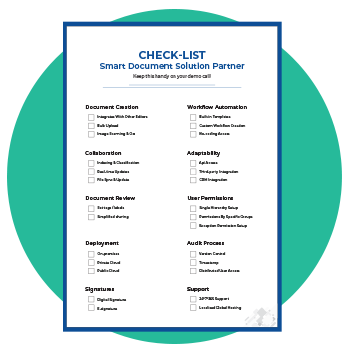
Here’s a checklist you can refer to, during your demo call with your Smart Document Solution partner.

Keep this handy on your demo call!

CHECK-LIST

Onboarding a Smart Document Solution Partner

Document Creation
  • Integrates With Other Editors
  • Bulk Upload
  • Image Scanning & OCR
Collaboration
  • Integrates With Other Editors
  • Bulk Upload
  • Image Scanning & OCR
Document Review
  • Set Tags / Labels
  • Simplified Sharing
Deployment
  • On-Premises
  • Private Cloud
  • Public Cloud
Signatures
  • Digital Signatures
  • E-Signatures
Workflow Automation
  • Built-In Templates
  • Custom Workflow Creation
  • No-Coding Access
Adaptability
  • API Access
  • Third-Party Integration
  • CRM Integration
User Permissions
  • Single hierarchy setup
  • Permissions by specific groups
  • Exception permission setup
Audit Process
  • Version Control
  • Timestamp
  • Distributed User Access
Support
  • 24/7/365* Support
  • Localised Global Hosting
Request a Demo
Integration
November 18th, 2025

How Going Digital Fast Tracks Your Salesforce Automated Process

No matter if a business is running at a small, medium, or large scale, improved productivity remains the most important KPI (Key Performance Indicator). Successful leaders always look forward to improving processes, minimize errors, reduce costs, and boost employee morale so that productivity never goes down the line.

Here we’ll talk about one of the most important sales processes – Salesforce Automated Processes and the way to fast track it. Follow the below stated approach to fast track the process of creating and sending quotes via Salesforce and cut it short from days to minutes.

Go Digital to Embrace the end-to-end workflow automation

No doubt that Salesforce offers a complementary suite of enterprise applications using which one can automate the sales processes. But what if you can let your sales team embrace it even more? Yes, that’s possible! End-to-end automation for your team lets them create, track, and eSign documents, all within Salesforce. MSB Docs made it possible through an integrated approach that automates document transactions and eliminates manual efforts and errors.

Simplify and Accelerate the Sales Pipeline

All the important documents that are being used on daily basis can be converted in the form of document templates and can be reused with minor edits. This is how MSB Docs & Salesforce integration reduces time spent on creating proposals, contracts, on-pagers, etc., and sending them across to clients. In addition to this, one can easily define the workflow and save it as a template by adding the users and their required actions on the documents. This results in getting sales proposals out in a timely manner. These documents and workflow templates can be reused any number of times once they are created.

Close More Deals Faster

With a clearly defined Audit trail in the MSB Docs platform, your sales teams can have real-time reporting on engagement and the activities that are being performed on your documents along with the insights. That means it becomes easy to track, monitor, and manage contracts and proposals shared with clients, and most importantly—close more deals at a faster pace. An average user experiences a great increase in closure rates post using the combined functionality of MSB Docs and Salesforce.

Experience Company-Wide Productivity

One can have quick access to business critical documents and clear visibility into all conversations. Setting up the MSB Docs + Salesforce integration for your team fosters more efficiency and transparency inside every department. The best thing is, your team need not be trained on a separate set of software as they are well-versed with the Salesforce platform, they can continue leveraging the combined benefits within it.

Conclusion

Being able to create, send, track, and eSign key contracts, proposals, etc., directly within your CRM software reduces 50% of the time required in document transaction. This, in turn, increases 20% value per deal. So, what are you waiting for? Get hold of it and watch your close rates start to climb.

Get in touch with us and start focusing on actually scoping the work rather than just creating the documents. We will provide you an integrated solution in a customized way that works best for your team.

eSignature
November 18th, 2025

Bid Adieu to Invoice Delays & Say Hello to Astute Transactions

Since we are living in the era of “one-click order and same-day delivery,” invoice clearance becomes quintessential. But if you stubbornly hold onto paper invoicing processes, printing out bills and sending it to customers by post, then nothing can help you out.

On the other hand, if you are ready to take advantage of technology, more significant opportunities are waiting for you that accelerates your invoice approval and payment process. Here, in this blog post, we are going to talk about what solution MSB Docs holds for handling invoices that let you say goodbye to delays and hello to fast transactions.

MSB Docs smart document solution transforms the paper-based and manual invoicing processes to paperless invoicing. Going paperless with MSB Docs will not only let you avoid late payments and get paid on time but also offers numerous benefits. Let’s go through them one by one:

Simplified Processes

As every administrative and accounts team already has a lot on their plate, paper-based invoicing introduces more complexity. MSB Docs offers easy to use platform where the users can take this process digitally. Using the MSB Docs platform, one can easily prepare invoices, create workflows, send invoices for review and approval, track status, and store data with anytime any device accessibility.

Reduced Costs

The manual and paper-based invoicing process adds unwanted costs and seriously erodes profit margins. Whereas going paperless with MSB Docs is an only one-time investment in technology that too, is less than what the traditional way holds. It has been found by GXS that electronic invoicing reduces costs by as much as 60%. You get more out of your investment when you experience higher levels of personalization with MSB Docs.

Achieve Clear Visibility

As MSB Docs offers cloud storage with smart categorization, one can easily have clear visibility of invoice data as compared to physically stored paper documents. Smart categorization lets you categorize your documents stored on the cloud in a way that is easy to access. This ensures you have a track record of invoices generated and further helps you categorize it based on paid and pending ones.

Real-time Access to the Status

Out of generating invoices, taking approvals, and receiving payments, the approval process is the most time-consuming process when it is being done manually as there’s no way out to track its status. MSB Docs offers greater efficiency that lets you keep track of each invoice that is transacted with a defined workflow and accelerates the purchase-to-payment cycle.

Minimize Errors & Risks

Opening a stack of mail, sorting invoices, reviewing, and verifying against POs (purchase orders) are labor-intensive manual components of the invoicing process. No doubt, these are the most important steps but are more prone to errors too, if done manually. MSB Docs lets you digitize them and get things going with a couple of clicks and that too with higher accuracy rates. This also eliminates the risks of generating wrong invoices and getting inaccurate payments.

Increase Security & Compliance

With the increase in your clientele, the need to manage large volumes of invoices also increases that makes it difficult for your organization to ensure compliance and control risk. With that in mind, MSB Docs allows its users to customize their workflows so that they can be tailored to help them maintain security and compliance and even reduce fraud.

Keep Everyone Happy

When complex manually dependent invoice processes are simplified, your team will start experiencing speed and efficiency in the process. This will not only let them focus on high-level initiatives but also keep them happy at work. On the other hand, timely and error-free invoices when delivered to clients, they also feel delighted while planning for releasing payments on-time.

Hopefully, the above points must have encouraged you to go paperless with your invoicing process. So, what are you waiting for? Get in touch with us and start sending invoices with total precision and least chances of clerical errors, delays, and lost invoices. Best of luck!

Request a Demo
eSignature
November 18th, 2025

Digital Workflows – A One-stop Solution for Distributed Workforce

” The first step is always the hardest, but it is a must to unleash the opportunities waiting ahead.”

Going digital might appear like a big hurdle – especially for those organizations that entirely depend on paperwork and manual processes. But till the moment you don’t take the first step towards digital transformation, you will never know what all opportunities are hidden behind.

So, here in this blog post, we introduce you to the digital workflows – which quite simply implies a “paperless” way to manage your current paper-dependent business processes. This will not only simplify your first step towards the digital transformation journey but also make you confident in transforming your entire business.

So, let’s begin with…

What are Digital Workflows?

Digital workflows are a series of steps that one needs to perform in order to execute a task via digital means. When the processes are executed automatically based on a certain set of rules, then “Workflow Automation” takes place, and that’s where the future is headed.

How Digital Workflows Differ from Traditional Workflows?

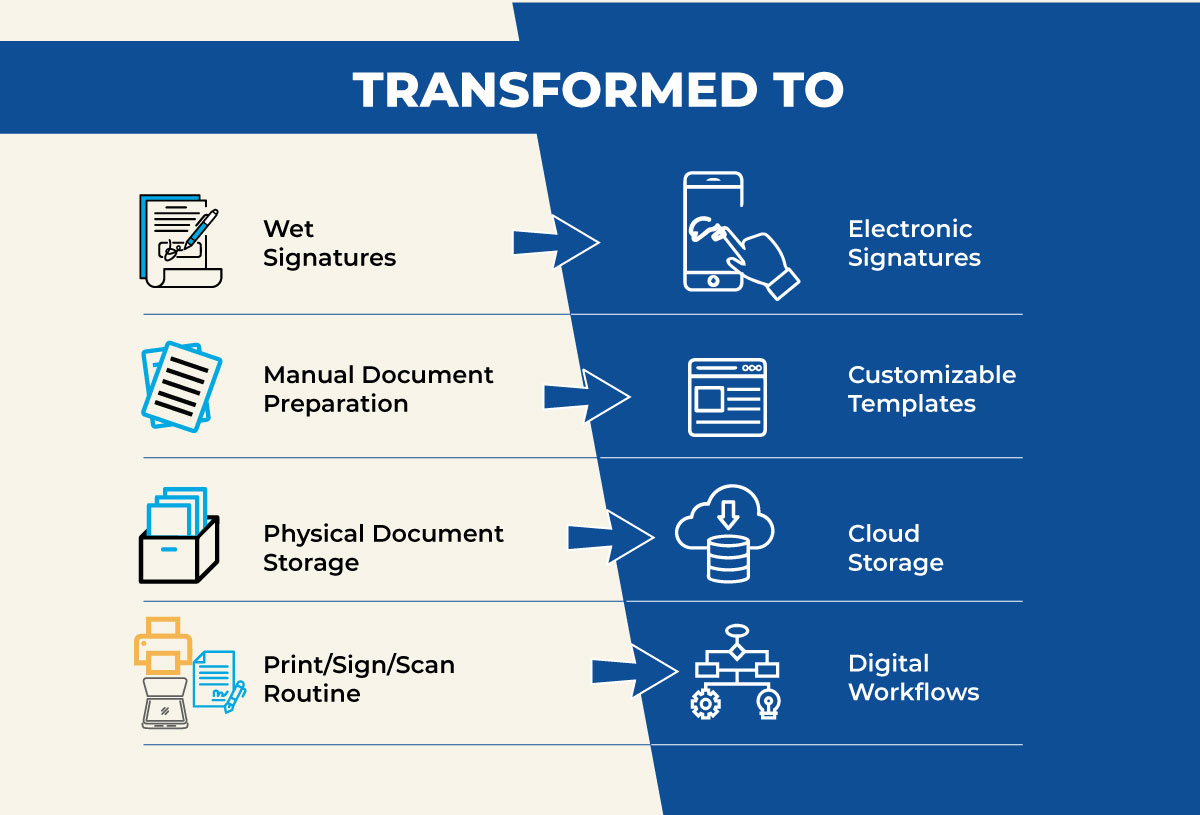
Traditional workflows are all about manual intervention from start to finish of a task, whereas digital workflows are all about automation. When one switches from traditional to digital workflows, paper notes get converted to digital task managers, and manual workflow setup is transformed into digital workflow engines. When this transformation takes place, processes become more consistent and let the user do a better job of it, because one is less likely to skip steps when everything gets automated.

Why, Digital Workflows?

Digital workflows have a transformative power that enables it to replace manual workflows with ease. There are many reasons why one should switch to digital workflows; some of them are listed below:

  1. Eliminates guesswork
  2. Saves paper cost
  3. Saves time
  4. Provides a better experience
  5. Decreases repetition
  6. Reduces Errors

Digital Workflows by MSB Docs

At first, MSB Docs smart document solution took paper-based documents online, then made electronic signatures easy and now extended an amazing functionality for its users, i.e., automated digital workflows. Workflows defined using MSB Docs smart document solution streamlines tasks that ensures optimal productivity. One can define workflows for basic business document transactions to company-wide document-based processes with a few clicks.

Adopting digital workflows by MSB Docs lets you and your team have:

  • A clear structure
  • Friendly guidance
  • An intuitive user interface
  • Tracking feature with Audit Trail
  • Access control features for security
  • Ability to scan over content quickly and easily
  • A cross-functional process, i.e., easy collaboration
  • Customizability so you’re not bound to pre-made workflows

Conclusion:

Adopting digital workflows will let you turn mindless, repetitive tasks over to machines, and allow your distributed workforce to do more meaningful work. This would not only drive productivity and innovation but also employ greater automation in your business processes.

Need more information about how digital workflows can transform your business? Schedule a free product walk-through with us today!

eSignature
November 18th, 2025

4 Ways Paperwork Burns a Hole in Your Pocket

Today, even after two decades of digitization, paper is an active part of business processes. From memos to contracts; sales invoices to payslips, paper documents can be found everywhere. But using paper comes with its own challenges – like any other offline solution. Forget “print – sign – scan”, the amount incurred on sending out paper documents for approvals, or storing them in a physical archive is quite steep.

Below, we outline 4 challenges you face with paperwork – based business processes:

Reason 1 – Print, Sign & Scan

Documents by their very nature, require a creator, a signing authority, logistics, & storage. Let’s find out the real issue, one step at a time.

1. Creator drafts the first version – A hard copy is printed and sent for approval. Not tamper-proof, as multiple copies required at times

Key Cost: Printing & Paper

2. Signer(s) review the draft – As required, there might be multiple signing authorities. The document must go through each of them, and at times, back n forth.

Key Cost: Photocopies / Logistics / Productivity

3. Scanning drafts for storage & archival: Once approved, the hard copy is scanned to store a digital copy, while the hard copy is stored in archives.

Key Cost: Scanning & Storage

Time to Get Out of PSS (Print, Sign, Scan) Routine

Reason 2 – In-person Signatures

Be it banking, real estate, or commercial deals, in-person signatures are still the norm. They are considered trustworthy & legally admissible. And it might appear that for one-off signs, in-person signatures are the way to go. But scale this to 10 signs per document, and millions of documents to be signed (an ideal customer onboarding use case).

Like it or not, be it KYC verification or purchasing a new car, a majority of signatures today, happen on paper. And each signature comes with the cost of bringing the paperwork to the signing party, getting their signature, and storing it for accessibility.

Download Pfizer Case Study

How Pfizer, a leading pharma enterprise, migrated to Electronic Lab Notebooks with MSB Docs.

DownloadNow
Partner-pfizer

Reason 3 – Courier Charges

In the age of Google & social, paperwork is still being filed and sent via couriers for approval. Assuming that your organizations onboards just 100 new customers every day, physical KYC verification for them, at $3 per courier, will cost $300 alone, per day! And you have just got the sign – scanning, storage, and archival are costs to be incurred in the long run.

Reason 4 – Storage & Accessibility

Unlike digital documents, paperwork can consume a lot of physical space and continue to grow with time. The centralized storage unit won’t be big enough to hold all the documents and storage will have to be fragmented across different buildings, rooms, or sites. This transition reduces accessibility, and in turn, productivity.

Paperwork is usually prone to damage or loss, coupled with increasing storage costs. According to a report, about $1800 per year is spent on maintaining a single four-drawer filing cabinet, while it costs $200 to replace a lost document. Scale this across your organization and you’ll be in for a surprise.

Conclusion

While the challenges related to physical paperwork are many; the solution is just one. With a simple document management solution like MSB Docs or Docusign, documents can be created, signed, stored, or archived, from a single dashboard. And now No more in-person signatures – with video in-person verification & aadhar/social security validation, these document management solutions eliminate the need of visiting / sending documents over a courier to potential customers.

The documents are safe, easily accessible, and with cloud storage, your documents stay safer than ever.

Request a Demo
eSignature
November 18th, 2025

How Did MSB Docs Become a Lifesaver for Real Estate Business

Real Estate is dynamically growing at high speed in this business world. With this, the competition is getting tough each passing day. Since closing real estate deals require a lot of paperwork to be done on time, any missed deadline leaves the real estate agents behind the competition.

In such a competitive scenario, MSB Docs brings in a smart document solution that serves as a lifesaver for real estate businesses. The solution is entirely developed for its users to get out of the cumbersome paper-based processes. Switching from paper-based to paperless processes in real estate business is highly required to keep up with the competitors. Here’s how MSB Docs made it easier:

convert3

This transformation results in increased speed, reliability, and excellent customer service that serve as pillars to seal the deal. In addition to this, the usage of smart document solution offers various advantages to the real-estate businesses.

Continue reading to know about the benefits MSB Docs smart document solution holds for real estate agents:

1. Mobility:

This is one of the greatest perks of going digital using MSB Docs smart document solution. As real estate agents, when given the convenience of handling document signing and transactions through any mobile phone, tablet, or laptop, the need to be in an office is eliminated. This way, they can meet more people to expand their existing client-tale and send time-sensitive, essential documents to the clients and partners from anywhere anytime.

2. Efficiency and accuracy:

Completing and signing the documents manually are prone to errors. Time spent in handling errors and recreating these documents can be channeled elsewhere for maximizing real estate performance. So, MSB Docs lets its users manage documentation electronically and ensures that a document is not submitted unless it’s 100 percent complete. These omit the need for duplicating and revising half-filled and wrongly filed documents.

Continue reading to know about the benefits MSB Docs smart document solution holds for real estate agents:

3. Cost-saving:

The paper, ink, and shipping costs (including envelopes and postage) can be utilized in other productive way by going digital with MSB Docs as cloud computing and technology eliminates its need. In addition to this, when real estate agents give this leverage to their clients, leaves a lasting impression on them as they feel the cost-effectiveness in delivering required documents.

4. Enhanced Security:

Since the real estate documents are very sensitive, they need to be protected from cybercrimes and hackers. Team MSB Docs understands this need and offers the utmost security to its users. Each document transaction is validated to ensure integrity and authenticity. This solves the problem of impersonation and tempering of property documents. Hence, enhancing security at its best!

5. Faster turnaround:

Missed deadline means missing the opportunity in the real estate business. It’s better to ditch the traditional way of sending a document to your clients so that they can print, sign, scan, and send them back again, offer them electronic signatures with MSB Docs instead. This allows them to sign the documents electronically within seconds using any device in hand. Signing electronically seals the deal quickly, i.e., accelerates the turnaround time.

Conclusion

Switching to a smart document solution will revolutionize your real estate business. MSB Docs not only holds benefits for real estate agents but their clients too. So, if you want to increase your clientele, then book a demo now to get hold of the solution effectively.

eSignature
November 18th, 2025

Electronic Contracts Vs Traditional Contracts – Let’s bridge the gap!

With the increase in new avenues of digital transformation, the need for paperless processes has become even more significant. Instead of creating, printing, and sending paper documents across, many businesses are switching to its digital counterparts.

What’s the Reason?

Paper-based processes bring major dropdown in the workflow that costs many businesses in terms of money and productivity. One such process that causes a delay in closing deals and turns out to be a hurdle in business growth is Contract Management carried out in a traditional way, i.e. based on paper.

Those who are aware of the limitations in carrying out contract management processes in a traditional way have already switched to the alternative to traditional hard-copy contracts. Those who are not, lie in the group of people who are still skeptical of deciding to go with electronic contracts. So, for those, we are here with some differences between electronic contracts and traditional contracts with the hope to give much clarity on this part. So, let’s discuss them one by one.

Traditional contracts are time consuming whereas Electronic contracts are not

In the business world, negotiation in contracts is a major step that requires countless modifications. The print sign scan routine takes up a lot of time to handle it. Having face to face meetings is another drawback as a lot of unmatched time is consumed by both parties. This is not the case with electronic documents; handling negotiations are much easier when you go digital. Contracting parties can receive, view, and sign the contracts anywhere and anytime.

Electronic contracts involve fewer errors than traditional contracts

Carrying out contractual processes traditionally might leave either party with discrepancies as there are more chances of errors or manipulation. This leads to legal disputes and other situations in which one or both parties have no legal leverage. On the other hand, electronic contracts are completely automated, which means there are fewer chances of typographical errors, and one can easily track the manipulations if any.

Electronic contracts save you on unnecessary operational costs

The implementation of the contractual process involves manual time and efforts along with the material such as paper, printing, etc. That adds to the transactional cost of a contract. This additional cost disappears instantly when you switch to electronic contracts.

APIs allow you to integrate electronic contracts from your CRM

Switching to electronic contracts enables you to integrate the chosen platform with Salesforce, HubSpot, Microsoft CRM, etc. This broadens the functionality and the opportunities that you can generate from existing CRM. Staying with the traditional contracts won’t let you leverage such benefits. We, at MSB Docs, offer Salesforce integration to our clients.

Electronic contracts are legally binding

This is the main reason why there are people who don’t want to switch to electronic contracts. But the good news is that you don’t have to worry about it anymore! Electronic contracts are legally binding documents between two contracting parties within the common law. Contracting parties can sign the documents without compromising their privacy.

Electronic contracts let you easily track, and find data than traditional contracts

Since everything is stored on the cloud, there is no chance of losing data. MSB Docs also offers a smart categorization of documents so that one can track and find data easily. On the other hand, traditional contracts require physical storage, which is not as reliable as its digital alternative.

As you can see from the above differences that there are several advantages in switching to electronic contracts and getting rid of traditional paper contracts, so what are you waiting for? Get ready to save money, improve productivity, and create more secure electronic transactions than ever. Scale-up your business by going digital with us!

Healthcare
November 18th, 2025

Does MSB Docs Conform with HIPAA Compliance

Ink and paper are losing their momentum in many industries as almost every industry is trying to transform its processes digitally. Still, there are some industries which are legally bound to conduct a paper-based process and cannot shift to digital or electronic signing, whereas the majority of them are not. Thankfully, healthcare is one of the privileged industries that is not bound to any such exemptions and is legally allowed to use eSignatures and digital document transactions.

We, at MSB Docs, are helping healthcare providers by getting their document transactions to go paperless. Most of our conversations with our clients in the healthcare industry start with two major questions, “Are electronic signatures HIPAA compliant?” or “How MSB Docs is meeting the HIPAA requirements?” So, this blog post is aimed to deliver in-depth details to those who are still in a dicey situation to put a step forward in the digital world.

Before we start explaining the MSB Docs conformity with HIPAA, here are some of the major use cases where the healthcare industry can start adopting electronic signatures and digital document transactions using MSB Docs platform:

  • Patient onboarding
  • Billing forms
  • Consent forms
  • Medical prescriptions
  • Lab reports
  • Care documents
  • Provider agreements

Going digital with these processes will let the healthcare organizations offer top-notch in-patient as well as out-patient services, excellent care, and reduce costs in carrying out paper-based processes. Without a doubt, all this can happen by remaining in compliance with HIPAA requirements as MSB Docs meets compliance requirements across all industry practices, including the Healthcare industry.

MSB Docs Conformity with HIPAA

Complying with HIPAA rules is critically significant for health care providers. Not only the healthcare providers but also those who are offering services to them. MSB Docs proves conformity with HIPAA by fulfilling the following conditions required for HIPAA electronic signatures:

1 Legal Compliance

There are fundamental laws that recognize electronic signatures on contracts, documents, or agreements as legal and enforceable. MSB Docs complies with all of them, including the well-known Uniform Electronic Transactions Act (UETA) and the Electronic Signatures in Global and National Commerce Act (ESIGN).

2 User Authorization

Validating the identity of all participating parties is another major HIPAA requirement. MSB Docs fulfills this requirement by offering two-step verification by sending One Time Password over email or phone to all its users. This prevents disputes by validating the identity of every transacting party.

3 Message Integrity

Safety and security of all PHI (Protected Health Information) hold the utmost importance in the healthcare industry. MSB Docs tamper-proof storage and audit trail feature keeps the security levels up to date for all agreements before, during, and after use.

4 Non-Repudiation

According to HIPAA rules, every document transacted digitally should have a time-stamped audit trail. MSB Docs leaves no stone unturned by offering time-stamped audit trail functionality within its system. This prevents the healthcare industry from getting into an argument for the authorization to share PHI.

5 Ownership and Control

Saving the multiple copies of the same document on the server for future reference is the need for maintaining legal enforceability. At the same time, there is a need to ensure the integrity of PHI. MSB Docs fulfills these needs by offering complete ownership and control of each copy of the document to its users that are saved on our cloud storage.

Hopefully, the above requirements and needful done by MSB Docs against them ensures that MSB Docs conforms with HIPAA. So, without a second thought, transform your paper-based healthcare processes into paperless and reap the real benefits of compliance, mobility, efficiency, and cost-saving.

eSignature
November 18th, 2025

5 Myths About Electronic Signatures You Must Stop Believing

Over the years, we have witnessed unprecedented transformation on the technological front, which has probably doubled these days due to COVID-19 crisis. The reason? It is risky – carrying out manual and paper-dependent processes as social distancing is the new normal. So, almost everyone is trying to take their business processes online. In order to eliminate these risks, electronic signatures have turned out to be the savior.

Yet despite being one of the best technological innovations, electronic signatures were not put in much use. But now it has entered the mainstream culture in many businesses. The reason being it a reliable approach to carry out document transactions without physical interaction. But there are few businesses which still prefer to rely on paper-based processes.

What stops business from adopting e-signatures without a second thought?

Since electronic signatures have been offering enormous benefits to consumers and businesses, it has still been hit with many misconceptions. These myths cause unnecessary skepticism and become one of the reasons that businesses still fuss with an outdated “print, sign, scan” routine.

Henceforth, we debunk the 5 common myths attached with Electronic Signatures. In this blog post, we’ll bust them one by one. So, let’s start-

Myth #1

eSignatures aren’t legally binding.

That’s not true! Instead, electronic signatures are a secure and legal alternative to wet signatures. If one can give a viable proof of the consent and intent of the signatures carried out electronically then it is legally equivalent to handwritten signatures. In fact, more secure than a handwritten one.

Still apprehensive? Check this out: Legality of eSignatures. Here, you will get to know about the types of eSignatures and their legal standings that are similar to transactions carried out on paper.

Myth #2

There’s no difference between eSignatures and digital signatures.

Again, not true! The main reason behind this myth going viral is that these terms have often been used synonymously. Although they are completely different from each other. Digital signatures are accompanied by a uniquely assigned digital certificate key, while on the other hand, electronic signatures are accompanied by verified data that identifies the signer. This is not just the only difference between the two, so it becomes important to understand the difference in detail. Check this link for more details on how these 2 signature types differ: Digital Signatures Vs. Electronic Signatures.

Myth #3

Electronic signature is an unnecessary expenditure, and all solutions are the same.

Well, that’s not true either. If you still believe so, then list down the types and number of documents being transacted to carry out your business processes. Once done, calculate the shipping/mailing expenses, printing costs, and costs involved in the processes. You will have a fair idea that these are just a few of the unnecessary expenditures that can be eliminated by switching to electronic signatures.

All solutions are the same is another myth. The electronic signature solutions vary from each other on the basis of functionality and, most importantly, the cost. Here, you will get to see a detailed comparison of MSB Docs vs. DocuSign.

Myth #4

The only way to close a deal is face-to-face. eSignature will delay the process.

Another common myth attached to electronic signatures is that they delay a process, which is far from true. In fact, electronic signatures help you close deals faster from anywhere using any device. Any amendments in the agreements or contracts are easy to do without the hassle of printing, sending, editing and resending. All the changes are tracked and can be used for future reference. Some digital signature providers like MSB Docs help you create easy conditional workflows for signing contracts. Get more information on how you can close more deals faster .

Myth #5

It’s a lot of hassle to set up.

Well, if you really think so, then book a demo with some e-sign providers. With customizable workflow and document templates, your organization’s paper-based processes will move to digital in no time. The drag and drop option of signature tags anywhere in the document lets you highlight which sections needs signatures. With a single click, you can send these documents for signing or reviewing to multiple people (and store them for record keeping). So, nothing could be easier than that!

Conclusion

Hopefully, we delivered greater clarity over these myths. If there’s any other myth that you think we have not covered here, you can get in touch with our team of experts. We assure you’ll find most of your answers with MSB Docs.