Security & Compliance
November 18th, 2025

Gxp Compliance and Validation: How Going Paperless Saves Your Efforts

If you are running a business in life sciences or other regulated industries, you must be knowing what intensifying competition is. The shrinking margins, rapidly increasing product personalization and customization makes business processes even more complicated. Not only this, you must also be probably encountering the concept of GxP – one of the biggest concerns that pharma industry tries hard to address for ensuring the quality of their products. If implemented in the right manner, then delivering a safe and effective product is no more a challenging task.

So, Let’s Understand What Gxp is?

GxP is a general abbreviation for the “good practice” quality guidelines and regulations that were established in the U.S. by the Food and Drug Administration (FDA). The overall intent of these guidelines and requirements is to ensure that medicinal products, medical devices, biologics, and other food products are safe for consumption. In addition to this, there are regulations set to ensure the integrity of data used to make product-related safety decisions.

What Does “X” in GxP signify?

“X” is variable in the term GxP that defines a broad range of compliance-related practices such as:

  1. Good Laboratory Practices (GLP): It involves a set of standards for non-clinical laboratory tests and studies that are conducted for assessing the safety and efficacy of the product.
  2. Good Clinical Practices (GCP): A set of clinical trial regulations for the products that require testing on human subjects.
  3. Good Manufacturing Practices (GMP): A recommended set of practices by agencies for the authorization and control of the manufacturing of products.

Each of these practices involves several product-specific requirements. It is mandatory for every pharma and life sciences organizations to implement these practices based on the

  • Type of products they make
  • The country in which their products are sold

In addition to these good practices, there is another very important aspect of GxP, i.e. GxP Validation. Continue reading to get a detailed view of this aspect.

What is GxP Validation?

With technology and digital transformations, the manufacturers are rapidly optimizing medical devices and products manufacturing processes. They have stepped into the digital era in order to accelerate production and innovate new products. With this, the usage of computerized systems is on hike. These computerized systems need to undergo proper validation process. And under the Gxp regulatory compliance, this validation is referred to as GxP validation.

While validating, there comes a major requirement of documenting each evidence that showcases that the system is operating as intended. This documentation is further classified into the following:

  1. Functional Requirements
  2. Traceability Matrices
  3. Operational Qualification (OQ)
  4. Functional Test Reports

All these are collectively referred to as “Validation Documents.” These documents, the scope of the testing, and the testing rationale need to be accomplished by every organization that comes under regulatory industries as these are crucial for passing any regulatory inspections.

The Traditional Way of Keeping Up with GxP Regulations!

The traditional way of meeting these regulations was by carrying out paper-based processes that, too, manually. This results in complicating new product introduction pipelines in the life sciences industries. Many companies are left behind the competition while continuously failing to deliver a safe and effective product.

However, there’s a simpler solution to optimize manufacturing processes: eliminate paper production records and digitize the process. Almost every organization is now undertaking such practices as these regulations hold the potential to make or break a business.

Challenges Organizations Face with GxP Regulations

In order to ensure that the quality of the goods or services is consistently high, organizations need to focus on the following areas:

  • Traceability
  • Accountability
  • Integrity
  • Accuracy
  • Availability

You will get a detailed information on these areas and a right way to do it at link

How MSB Docs is an Ideal Solution?

MSB Docs – as a smart document solution, makes GxP compliance easier than ever. Most MSB Docs clients are pharmaceutical giants and are regulated by FDA – 21 CFR Part 11. Be it manufacturing, testing, or validating processes, today they have gone paperless with MSB Docs. Its ability to generate accurate and complete copies of records in both human-readable and electronic form make it the perfect fit for fulfilling inspection, review, and copying requirements by the agencies.

Apart from just offering electronic signatures, digital signatures, and online document transactions, the following MSB Docs features will help you understand what makes us stand out from the crowd:

  • MSB Docs offers server-based UTC time synchronization
  • There are customizable workflows to support business functions
  • There is built-in timestamp tagging in the platform
  • Each transaction records UTC time stamp even it is for creation, modifications or deletions
  • MSB Docs offers the ability to export Audit trail with UTC timestamp
  • All these documents stored in the cloud have a configurable retention period
  • Integration services to make MSB Docs part of enterprise business process automation
  • Validation of user credentials before accessing the system or before signing the document.
  • Team Room facilitates a group of users to plan, track, and collaborate in a central and consolidated view.

The list of features does not end here as there are many more that you will identify once you get into the system. So, book a demo with us now!

Get in touch with us
eSignature
November 18th, 2025

MSB Docs Digital Onboarding – Guide to Eliminate Paper from Paperwork

Whether it’s a Banking, Insurance, Regulated or High-risk Corporation, a secure and compliant onboarding is a need of the hour. In this competitive era, if you are running an organization and relying upon paper forms, wet signatures, and manual compliance checks for onboarding customers, then it’s an alarming sign for you to pull up your socks. Traditional onboarding processes are slow and inefficient to match up with the pace required to keep going in this world of digitization.

Here’s How Traditional Onboarding Risk Businesses in Falling Behind the Competition

The onboarding process involves a lot of documentation to be done, which requires in-person signing. With traditional practices, this turns out to be impossible when reaching people in different locations is difficult. Moreover, the cost and time needed to carry out these paper-based processes manually are much higher than their counterparts. At the same time, if these processes are undertaken manually, it involves a lot of print, sign, and scan hassle, which turns out to be more prone to errors and does lack security as well.

Digital Onboarding Came for Rescue!

Stepping into the digital world lets you take your business anywhere since all the manual paper-based processes are transformed into automated paper-less processes. This results in a drastic reduction in operational costs, improvement in client’s convenience, and ease in spotting new market segments. In addition to these, there are a plethora of benefits in transforming your paper-based process digitally. Going Digital:

  1. Makes processes quick and easy
  2. Is Highly Secure
  3. Increase Productivity
  4. No More Physical Documentation Required
  5. Is Legally Compliant

SEBI Prescribed Aadhaar eSign – Made Digital Onboarding Easier

SEBI has, from time to time, taken various steps in favor of making business processes as easier as possible. In the recent initiative, SEBI has enabled online KYC, eSign, Digilocker , and electronic signature as permitted by the Government of India under the Information Technology Act, 2000, and the Rules made thereunder. Now you must be wondering how it helped in making digital onboarding easier. Continue reading these statements in the recent circular rolled out by SEBI and you will get to know:

  1. Any Aadhaar holder can forward their documents by digitally signing the same using the similar eSign framework that was being operated under the provisions of the second schedule of the Information Technology Act and guidelines issued by the controller.
  2. According to the Section 5 of the Information Technology Act, 2000 recognizes electronic signatures (which includes digital signature) and states that where any law provides that information or any other matter shall be authenticated by affixing the signature.
  3. The eSign mechanism of Aadhaar shall be accepted in lieu of a wet signature on the documents provided by the investor. Even the cropped signature affixed on the online KYC form under eSign shall also be accepted as a valid signature.

Since the Aadhaar based signing is legally permissible, this eliminates the in-person signing process and all the documentation part can be carried out digitally.

Industries That Can Leverage the Benefits of Aadhaar eSigning

This use of technology can be made by the SEBI registered intermediaries.

Make Aadhaar eSigning Legally Permissible

In order to ensure that you are using Aadhaar eSign in a legal way, choose a platform where your mobile and email is verified through One Time Password (OTP) or other verifiable mechanisms. Note that the mobile number/s that are being used for verifying the signatures and are accepted as part of KYC should preferably be the one linked with the Aadhaar.

Leverage Added Benefits from VIPV (Video In-Person Verification) Feature

SEBI registered intermediaries can now make use of Video In-Person Verification for onboarding customers. Following are the requirements to leverage this benefit in a legal way:

  1. VIPV can be done only after obtaining your customer’s informed consent.
  2. This process should be done in a live environment.
  3. The activity log, along with the credentials of your customers with whom you are performing the VIPV must be stored securely and retrieved easily.
  4. The parties involved in the VIPV must be easily recognizable.
  5. Customers need to show the document, KYC forms and signatures during the call and might be asked to give confirmation using OTP.
  6. Once done, this VIPV must be saved digitally in a safe, secure and tamper-proof environment.
  7. The date and time stamps must be affixed with this saved VIPV.

If all such conditions are met, then a big hassle of carrying out in-person verification can be easily removed from the business processes.

MSB Docs Platform Has Aadhaar eSigning and VIPV Functionality Adhering to All Legal Requirements

MSB Docs being a smart document solution, offers their customers Aadhaar signing to enable a paperless customer journey. This helps our customers in digitizing document capture processes and automate the KYC and compliance in real-time. MSB also lets their customers use VIPV for onboarding by keeping all the specified requirements in place. Seeking more information? Get in touch with us!

eSignature
November 18th, 2025

How Information Security is Ingrained in Our People, Processes & Technologies

Information security is one of the integral requirements of our MSB system.

MSB Docs is the smart document solution software product that treats information security as a part of its DNA. All the information assets that are either owned by MSB Docs or by its customers are given equal priority and the level of end to end security. To assure that there are no loopholes in our security management practices, we:

  • Continuously maintain and grow our threat intelligence team to improve our cybersecurity capabilities.
  • Build a dedicated compliance team that ensures our smart document solution meets and exceeds the organizational and technical security standards that are set worldwide for the secured and successful transaction of documents.
  • Conduct regular and periodic independent information security assessments and audits to ensure that we are capable of coping with the stringent security requirements and establishing the adherence to security compliance and standards
  • All in all, we are trying to convert our organizational and technical security measures into our daily best practices.

Our commitment to data security beings with the following security compliance certifications that we hold:

  • MSB Docs is ISO 27001 certified company offering eSignatures and online document transaction services. Having certified with this standard ensures the interested parties that the solution is using adequate and proportionate security controls for information security.
  • MSB Docs uses AWS Cloud services for hosting the MSB production systems. The services from AWS are compliant to ISO 27001, HIPAA and SSAE 16/18 Service Organization Controls (SOC) by AICPA.
  • MSB Docs is EU-US Privacy Shield certified for the Privacy Shield Framework as set forth by the U.S. Department of Commerce. This basically covers the collection, use, and retention of confidential and sensitive information from European Union member countries.

In addition to this, MSB Docs assures security by delivering world-class features developed taking security measures into consideration that include confidentiality, integrity, availability, authenticity, and non-repudiation. Let’s take a deep dive into what all these terms mean for us and how we are doing justice with them:

Confidentiality:

MSB Docs ensures confidentiality by providing AES 256-bit encryption, Single Sign On (SSO) functionality, SAML authentication, and Oauth authentication. In addition to this, all passwords are securely hashed and salted inside the MSB Docs platform.

Integrity:

All the documents that are transacted through MSB Docs platform are sealed with PKI digital certificate (Entrust) technology. To avoid the tampering of data, a specialized tamper-proof seal is also embedded in each document. Since the sessions expire after a certain time, it helps in illegal access to the platform.

Availability:

We have various data centers for keeping our client’s data safe, secure, and highly available. In addition to this, we have our disaster/ disruption management in line to cope up with the production system outage situations. This helps in recovering the production systems with ease and maintains business continuity in any situation.

Authenticity:

The authenticity of the signer can easily be detected with a secure audit trail offered for every document transaction. It is basically a record in a chronological sequence of document transactions. According to the user’s requirements, we also provide two-factor authentications and API key-based authentication for the API.

Non-repudiation:

MSB Docs comprises of a variety of unique features for non-repudiation:

  • An electronic audit trail for every ePak (documents).
  • Digital records of the users or the recipients accessing the ePaks.
  • Receipts and notification of workflow completion.

Hopefully, we are able to give you an overview of how information security is ingrained in our people, processes, and technologies in this blog post. If this seems interesting, we can help you with more information, get in touch with us at www.msbdocs.com/contact-us

eSignature
November 18th, 2025

3 Ways We Cut-Short the MSB Docs User Acceptance Testing

Every software is designed and developed for the ease and usability of end-users. When these criteria are missed or avoided by the team, then, the final product does not match the expectations. So, it is highly essential that development teams should look at the product from the user’s standpoint.

The development team of MSB Docs designed such a smart document solution that fits all, and if not, then with the easy customization options, they get the job done. After offering such a refined and customized product to our clients, we are always happy to allocate them with everything their UAT team needs to carry out the testing.

UAT let them ensure that the product meets both the requirements and expectations. Since every product is developed to ease out the task or solve a particular problem, UAT is much needed to evaluate whether the purpose is met or not. This UAT usually consists of 3 phases, let’s have a look at them and also discuss how MSB Docs cut-short these phases and ease out MSB Docs user acceptance testing:

Planning

Although planning is the initial phase of UAT, it is still mostly being initiated after the end game, i.e., when the final product is developed. This phase includes the creation of test cases to evaluate the product to understand better if the requested functionality was understood by the development teams or not. Preparing these test cases from scratch takes up their lot of time and in addition to this the cost of fixing bugs is much higher with the chances of accentuated risk as well. To save that time MSB Docs share their test cases with the client’s UAT team. On the other hand, to save the cost and minimize the risk, MSB Docs adds this phase to the master project plan and schedule it across the life of the project. We ensure that the UAT is scheduled every two sprints and is conducted by a highly professional team of analysts. We also reach out to two external customer representatives in order to ensure that we all are on the same page.

Note:Apart from this, we always ensure that our QA team do a full smoke test on the UAT environment before the client finally accesses the product. Most of the inconsistencies are tracked at that point only.

Execution & Tracking

This phase offers a perfect time to disclose every important aspect of the developed product. Majorly companies don’t provide that full disclosure as they tend to hide the major bugs from the clients. This sometimes results in losing trust and a positive relationship with them. On the other hand, MSB Docs offers every piece of know-how about the product. All the historical records of test cases are shared with the clients along with the screenshots that help them finish the UAT much faster. If the clients have any queries or assistance while carrying out the UAT, our technical Project Manager, Quality Assurance representatives, developers and network administrators are all set to sync up with the client. That is why our relationship with clients goes a long way.

Reporting

After the successful completion of the UAT, the reporting phase plays a vital role in finding if the customer is happy with the results or not. We at MSB Docs assist our clients by showing them the objective evidence report that consists of all the screenshots of the test cases. This helps them in summing up the things in the final report and add their remarks to it. Since every major to minor changes during the project lifecycle are tried and tested thoroughly, and shared by us, reporting the issues becomes much easier for our clients testing team.

Conclusion

Saving the historical records of every test case and presenting them in the form of an objective evidence to our clients offers core stability to our business process. On experiencing such consistency around our quality processes, our customers notice and appreciate us. All in all, MSB Docs always aims to get the job easy for you!

eSignature
November 18th, 2025

Guide for Smooth Transition to Work from Home

According to the World Health Organization, Coronavirus (COVID-19) has officially been categorized as a pandemic. That means it has spread across a vast region, for instance, multiple continents, or worldwide. To stop this spread from increasing day by day, many countries have banned travel, shut down schools and universities, and stopped large gatherings of people. In other words, this Coronavirus spread has locked many of us in our homes.

Many large or small organizations are encouraging or mandating work-from-home for their employees’ safety. The following statistics would give you a clear vision:

  • Big tech firms like Facebook, Google, Twitter and Amazon have implemented remote working policies for almost all their employees around the globe.
  • Reliance Industries switched to work from home, keeping only a few of their workforce open who are directly interacting with customers.
  • Around 7000 employees of Mahindra & Mahindra started working from home for protection against COVID-19.

However, many companies are giving work from home, they are also facing pressure as many of these organizations are not as ready for the transition to work remotely as they thought they are. One in two (54%) companies in India can’t support work from home as they lack the required technology and resources, Gartner says.

This is due to the lack of collaboration tools and a lack of interpersonal training. Workers are asked to “self-quarantine” and use social distancing that means no more office meetings, client meetings, collaborative brainstorming, socializing instead, they are losing more time by getting distracted by news about the virus. Resulting in which they are losing productivity by working from home.

Here in this blog post, we are going to share some of the tools that will help organizations in overcoming the Coronavirus work crisis.

Slack for Effective Communication:

Slack is a chat room for remote workers. This fast and easy to use tool saves a lot of time that we usually spend in communicating through emails. You can use slack for either carrying out the group discussions or private messaging, sharing information, files, and more. It’s easy to organize communications by setting up different channels.

These channels are not just only for your team members but also for vendors, partners, and customers for communicating things. This eliminates the need to travel and make working from home easy for you and others connected with you.

Zoom for Video Conferencing:

Sometimes communication through chat does not seem to be effective. Video communication plays a vital role in carrying out conference calls, webinars across mobile, desktop, telephones, and room systems. All you need to have is a webcam, video conferencing camera, or phone with a camera. The best part is you can share your screens while the video conferencing is going on. Record the meetings for future reference. If you are using Slack, it’s easy to sync Zoom with it.

MSB Docs for Digital Transformation:

Streamline your work by transforming paper into digital artifacts. This effective digital transformation digitizes all your paper-based processes that require manual intervention. Working remotely becomes easier as you can avail of all the required documents edited, signed, and stored in a cloud repository accessible by you and your team members working remotely.

Moreover, document transaction is completely secure with MSB Docs because of robust identity authentication process. Since it is entirely customizable, so you don’t need to worry about the use cases to involve it in your organization. For exclusive collaboration, we also offer REST & SOAP-based APIs that can be used to connect disparate business applications you are already working with. To support work from home MSB Docs is offering free license with unlimited usage for 30 days. So that everyone can enjoy collaboration, document management, and electronic signing by staying safe at home.

Trello for Task Management:

Project managers face a lot of challenges while managing projects and tasks remotely. Trello brings in a one-stop solution to organize such projects and tasks into Kanban boards. It’s easy to determine the tasks in line, take a follow-up status of each task, and recognize the people working on it. You can create cards for different tasks and park them to the done list once finished. This eliminates the need for face to face clarification meetings and lets you work remotely.

SharePoint for Cloud Storage:

A need for storing and sharing heavy files across your team members is the daily chore of especially IT professionals. The files need approvals, edits, and recreation that results in several versions of a single file. It is highly essential to have cloud storage service or online backup service all set at your end while working remotely. SharePoint serves this need very well. You can save files to folders, add new folders, access the ease of drag and drop files among folders.

Apart from these tools that will help you in being more productive and work collaboratively, you also need to map a strict routine for yourself.

  • Stay self-motivated and disciplined
  • Have a dedicated workspace
  • A stable internet connection

Hopefully, you are now all set for smooth transitioning to work from home. Stay productive…!! Stay Safe…!!

eSignature
November 18th, 2025

Which Departments Need Digital Transformation with MSB Docs?

Drafting, printing, scanning, and filing documents – a process that was said to be a necessary part of any organization is now getting easier and easier to banish. All thanks to the advancement in technology that is continuously evolving our vision to take business processes in a better way.

Make sure, to take the full advantage of this digital era, whatever plans you make for your organization’s successful future, having digital transformation included in it is a need of the hour. But before that, you need to figure out where your organization should start transforming digitally to reap more benefits and rapidly close more deals—all while keeping it legal and secure. To help you in making a wise decision, we are going to share a few of the common processes taking place in different departments of almost every organization where digital transformation can be implemented.

HR Department – Employee Onboarding

From interviewing a candidate to onboarding employees, there is a lot of paperwork that needs to be carried out by the HR department. If all this documentation is carried out digitally, a lot of effort is saved, and the HR department can spend that time seeking eligible candidates more proactively. Now you must be thinking how? MSB Docs – a smart document solution makes it happen by offering digital onboarding.

  • This platform allows the HR department to carry out interview evaluations in a better way digitally by taking feedbacks from multiple people along with their signatures in a single click.
  • If the candidate is selected, the HR Department can send the offer and appointment letters digitally to them for signing electronically via desktop or mobile.
  • Along with accepting the offer, candidates can share their required documents as an attachment to the HR Department before they step in the office.

Accounts/Finance Department

Most of the accounts and finance processes involve creation and approvals of agreements, invoices, purchase orders, expense reports, audit signoffs, etc. Meaning that if done manually, a lot of paperwork needs to be done with almost zero visibility into the status of every document in the process.

MSB Docs here plays a vital role by offering the following features to ease out the paperwork of this department. Let’s throw light on some of the best features:

  • Document templates: Repeatedly used documents can be saved as templates in MSB Docs. This helps the user in saving their time in recreating the similar documents repeatedly.
  • Electronic/digital signing: All the invoices, expense reports, agreements, or any other documents that need to be signed by the management team working remotely can be easily carried out using MSB docs electronic or digital signing features.
  • Easy Categorization: Since multiple types of documents are being managed by this department, MSB Docs brings in the easy categorization of documents through labels.

Product Development/Management

In product-based organizations, the primary requirement is to speed up the delivery of products. But how is it possible when multiple inputs are being given that not only moves the timelines but also affects the facilitation across the team. Adding MSB Docs to your product development processes might improve visibility across your organization.

The benefits you will experience while carrying out all your document management, signing and storing with MSB Docs are:

  • Easy Requirements Signoffs
  • Effective & Approved Product Roadmap
  • Change Request Management
  • Review & Reporting

Sales Department

Sales reps always need to be ready with the polished agreements that need to be sent to multiple people at remote locations. At the same time, they need to be prepared for the edits and negotiations on those sales agreements. Keeping track of each version is also what is essential for effective communication within their team. MSB Docs is all set to help these sales reps in performing all these activities under one roof. So, if this smart document solution is implemented in the sales department, then creating, editing, and sending these documents for signatures and review turns out to be more productive. Automate workflows, setting up reminders, and notifications are some of the additional features that sales reps can take advantage of while closing the deals.

Similarly, MSB Docs empowers many other departments and ease out the processes involved in them. To know what all benefits you can avail, go ahead and get started with our free trial.

eSignature
November 18th, 2025

Work Smartly with Smart Categorization Offered by MSB Docs

The rapid increase in technological advancements has a substantial impact on many businesses. With this, MSB Docs is always trying to introduce the best of features and innovations to make customers’ experiences better every time they interact with our end to end cloud-based system. In this blog post, we are going to talk about an amazing feature that MSB Docs came up with to categorize all the documents that enhance the cloud storage option. This unique and interactive way of categorizing the documents is known as Smart Categorization.

How Smart Categorization works?

In the business world, a large number of documents are transacted on daily basis. While sharing confidential documents remotely using the MSB Docs platform, you can now leverage the benefit of categorizing these documents safely by adding the smart tags for each of your documents. These smart tags can be any word that is associated with that document. This makes document searches faster and provides a better user experience by highlighting top categories upfront.

Why is it so Handy?

Along with the broad set of documents being transacted, these documents also have different types and formats. These formats include pdf, word, excel, data, and images, etc. So, when you try to extract these documents from these diversified formats, then that seems a big challenge. Isn’t it?

On the other hand, if these documents are categorized in such a way that extracting them is as easy as shooting fish in a barrel, then it would save not only your efforts but a load of time as well. Smart categorization offered by MSB Docs comprises such ease of categorizing the documents.This seems much helpful when you handle the bulk of documents every day, especially of different types.

Value Addition of Smart Categorization to Customers

Almost every business that has partnered with us and using MSB Docs for their document transaction is making use of this amazing functionality. Upon having their valuable feedback on their experience, we have jotted down the following points that explain the value addition that smart categorization has brought to their business. Let’s go through them one by one:

  • No more manual training is required to be given on which documents are kept where.
  • The speed of categorizing documents has drastically improved with smart categorization.
  • Reduced manual effort in capturing, categorizing, and extracting the documents improves productivity.
  • As there are fewer manual efforts, the chances of errors also reduced.
  • The user interface for the classification of documents is way too easy for anyone to understand.
  • Having documents stored into a single as well as well-organized archive lets you easily migrate them anytime, anywhere.

The list of value additions doesn’t end here, as there are many more based on the type of industry. To know, how smart categorization is going to benefit you and your business, start using MSB Docs – smart document solution now. Visit us now to know more.

eSignature
November 18th, 2025

Boost Business Productivity with MSB Docs Integrations

Have you ever jumped between multiple software and applications just to finish a single document? If yes, then you know the struggle very well. Since the use of multiple applications is the need of the hour in the business world it is important to find a one-stop solution for it.

MSB Docs has launched its easy to integrate API for its users. With this API, businesses that use multiple applications to prepare and store their documents can also send them for signing with MSB Docs without switching the interface. This is possible by integrating the full capabilities of MSB Docs into the applications they are already familiar with and comfortable working with.

Who makes it possible?

Our highly experienced developers are always ready to build this seamless document signing experience for our clients. They ensure that our clients don’t need to switch to an external document signing environment to complete their documentation needs. Instead, they remain in the application they are comfortable working with while accomplishing their document signing needs with MSB Docs.

There are 3 significant reasons one should consider using integrations. Let’s be familiar with them:

  1. It Simplifies Things – With the integration, user experience much simpler interface to interact with and feels everything is available in one space. This eliminates the need to manage multiple applications and their logins for different solutions that accomplish their business goals.
  2. Integration offers Automation– MSB Docs offers complete automation and there is no need to manually create the documents, download them and then upload it into MSB’s platform for signing purposes. All the data will automatically flow and be shared across systems, which saves your time and increase your team’s productivity as well.
  3. Standardize your processes – Integration eliminates the administrative tasks so that the team can spend more time on value-adding tasks. If your team is spread across multiple locations, it will become easier for you to standardize the processes by implementing best practices.

MSB Offers Integration with Following Applications to Streamline your Business Processes:

MSB Docs Box Integration

You can use MSB Docs as a default application with your box account. This benefits you with a faster, more flexible way to access, update, and send your contracts, invoices, order forms, lease agreements, or any document for signature easily.

MSB Docs Outlook Integration

Upon linking MSB Docs and Outlook, you would get relieved from print, sign, and scan routine. This is possible as you can sign and send documents straight from your Outlook inbox. All this document transaction would be considered legal and is highly secured as well.

MSB Docs Word Integration

It’s easy to edit the documents with MSB Word and send them directly from MS Word for signing using MSB Docs. In addition to this, you can easily drop the signing tags at appropriate positions in the document and define the workflow to process that document the way you want.

MSB Docs SharePoint Integration

Access your documents stored in SharePoint, edit them, and send directly for signing using an integrated MSB Docs app. Once these documents are received back after signing, get automatically saved to your SharePoint account. Thus, while you are managing your document on your SharePoint you can send and receive back documents after signing.

MSB Docs Salesforce Integration

Pushing and pulling of data between Salesforce and MSB Docs is easier than ever. All your Salesforce customers can accept proposals, contracts, and quotes with one tap that simplifies approval workflows, all on MSB Docs, a secure digital platform.

All these MSB Docs integrations let you leverage e-signatures in the most productive way and make the best out of the solution. Such synergies add not only esignature capability to your platform but also reduces overall cost, TAT, and enhances overall process efficiencies. As a result of this, you will be able to gain more control over your document flow, visibility, and accountability.

Now that you are aware of the integration and their benefits, stop plugging data from one system into another or rewrite the same content repeatedly. Get in touch with MSB Docs to reap the benefits.

eSignature
November 18th, 2025

Handle Your Documentation Smartly with MSB Docs OCR

Have you ever heard of OCR technology? If not, then you are missing out on something very important that lets you handle your documentation smarter. OCR is not a technology that is newly introduced. Although its benefits have been leveraged since the last century and has been offering amazing functionality in telegraphy and reading aids. Now with the advancement of technology, the use cases and the benefits of OCR are increasing day by day.

Before we discuss further about the benefits, let’s first briefly discuss what exactly OCR technology is?

Optical Character Recognition (OCR) is a technology that identifies and extracts information from documents and images. Once extracted, it converts those scanned images and old paper into editable digital files. This process happens in real-time and kicks-off the automated workflow processes in minutes.

Automated workflow is not just the only benefit being offered by this technology, but there are many more on the list. Continue reading to find out how OCR is benefitting globally.

OCR Saves Time & Improves Profitability

Time and cost spent in the realm of manual data entry have been reduced by 75% with the introduction of OCR technology. Such reduced data capture times allow businesses to utilize their manpower in another productive manner. This, in turn, helps in improving the profitability of the business.

Provides High Precision Predictions with Improved Accuracy

In businesses like accounting, where getting the numbers right requires processes that promise complete accuracy. OCR is well designed with an intuitive in-built algorithm that takes on the process of analyzing and extracting information with verified accuracy. This level of accuracy offered by OCR surpasses that of the human eye and provides an ease of performing high precision predictions that promote business success.

Save Environment by Going Paperless

OCR lets you save the environment by going paperless and declutter the office in minutes. With the help of OCR, the users are now free from the use of paper to accomplish prepare, print, store, and photocopy processes. One can easily file all the documents on the cloud and retrieve them anytime, anywhere.

Keep Your Employees Happy & Engaged

Let’s face the truth; paperwork done manually isn’t fun. If being a business owner anybody desires to keep employees working in the long term, one need to understand what makes them happier and more engaged. Paperwork is nowhere on the list. OCR eliminates that boring paperwork for your employees and lets them instead focus more on analysis that supports you in the revenue-driving line of business.

OCR Offers Better Auditing & Reporting

OCR helps businesses avoid fraud by enabling accurate auditing and reporting of business expenses. Auditors can easily conduct these audits with better depth and faster turnaround time. This lets them easily analyze the transaction details rather than just depending upon the reports provided by staff.

How MSB Docs Users Leverage the Benefits of OCR?

Many industries, including logistics and transportation, hospitals, and banking, were already making use of OCR. When our clients from similar industries reached us out for the smart document management and signing solution and found OCR to be an added functionality, clicks them to close the deal faster. The one who is using the OCR knows the benefits that it brings along with it.

Under the same interface that MSB offers, our clients can digitize their documents, send them for signing with complete security measures, and finally store them in a tamper-proof cloud repository.

OCR being a revolutionary technology, doubles its power when combined with our smart document solution. So, what are you waiting for? Adopt this unique capability of digitizing documents quickly and easily with MSB Docs. We help you book a trail and ensure your purchase decision. Get in touch with us now!

eSignature
November 18th, 2025

3 Easy Steps to Get Your Sales Contract Signed in Minutes

Salespeople working with any small or large enterprises are spending most of their time in old-school or standard sales practices. In return, these practices bring in increased friction for leads that clog up the cashflow as well.

If you are still working with the same old school sales practices, then it’s time to empower your sales department. That is essential if you genuinely want to sustain your customers. In this blog post, we will walk you through the process offered by MSB Docs to get your sales contract signed in minutes.

MSB Docs makes it easy to complete, sign, and store sales contracts online. Yes, online! Now you must be thinking, is it legal to perform the process of sales contract online?

Absolutely yes, according to the E-SIGN Act, documents signed and sent online have the same legal protections as those done manually using pen and paper. The only one thing you should keep in mind is that you must choose an eSignature and digital document management tool that offers robust legal and secured features. MSB Docs offers a smart document solution that is both legal and secure. All the documents that are signed via MSB are legally enforceable under IT Act 2000 (India), ESIGN Act (USA), eIDAS (EU), FIPS 140-2. You can grab more details about it by getting in touch with our team.

Now if that you are sure about the legality and security of signing sales contracts online, let’s move ahead with the step by step process used by MSB Docs.

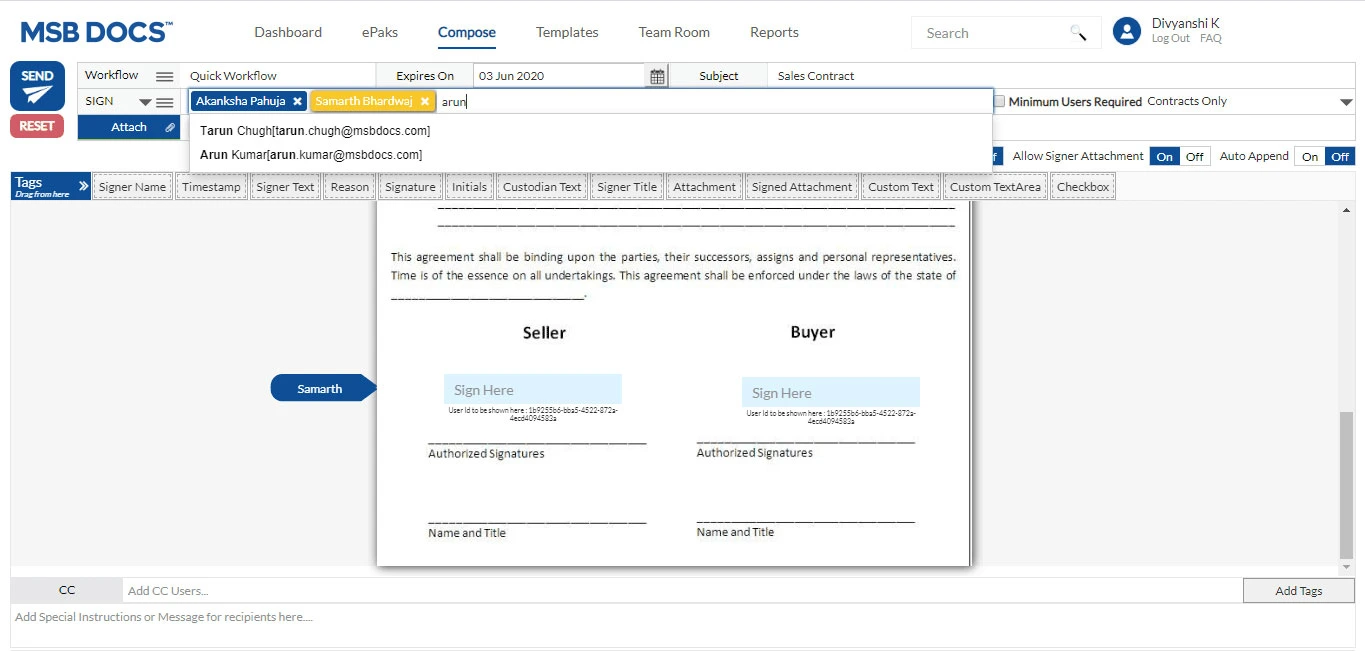
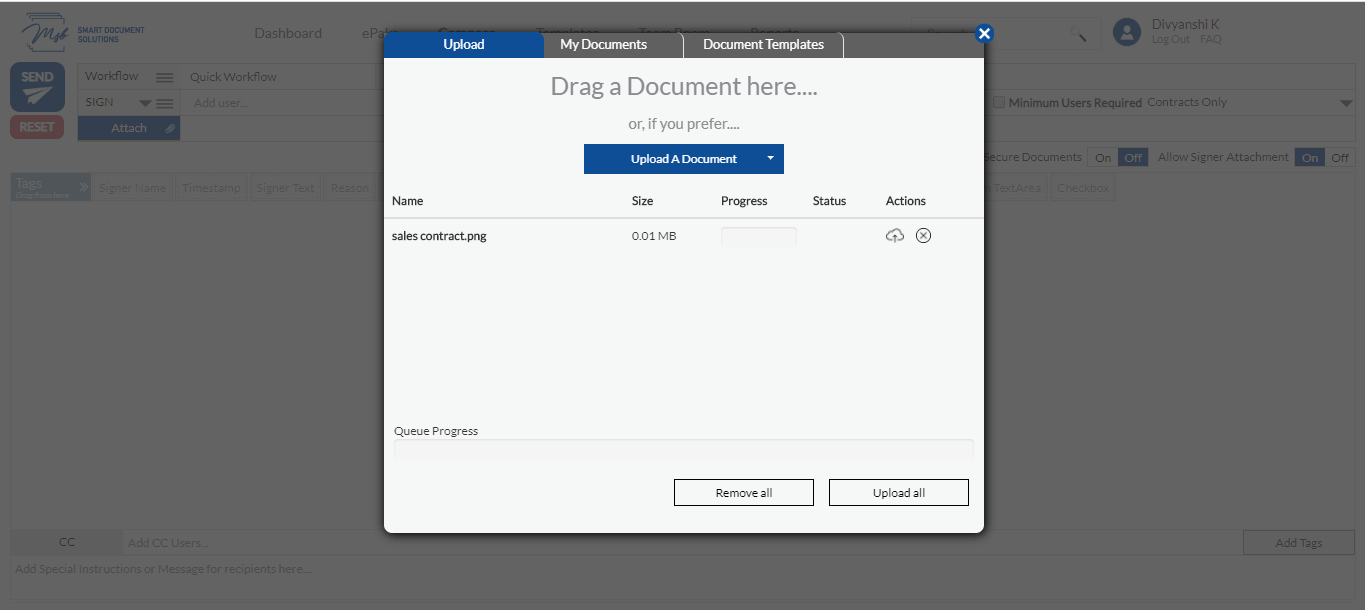
Step 1: Upload your sales contract to MSB Docs

To begin with, you must first have your sales contract file as a softcopy. You can use a simple sales contract templates that are available online, but it is highly recommended that you must have any contract drafted or at least reviewed by a professional. Then, log in to the MSB Docs platform and upload that sales contract to MSB Docs.

OCR

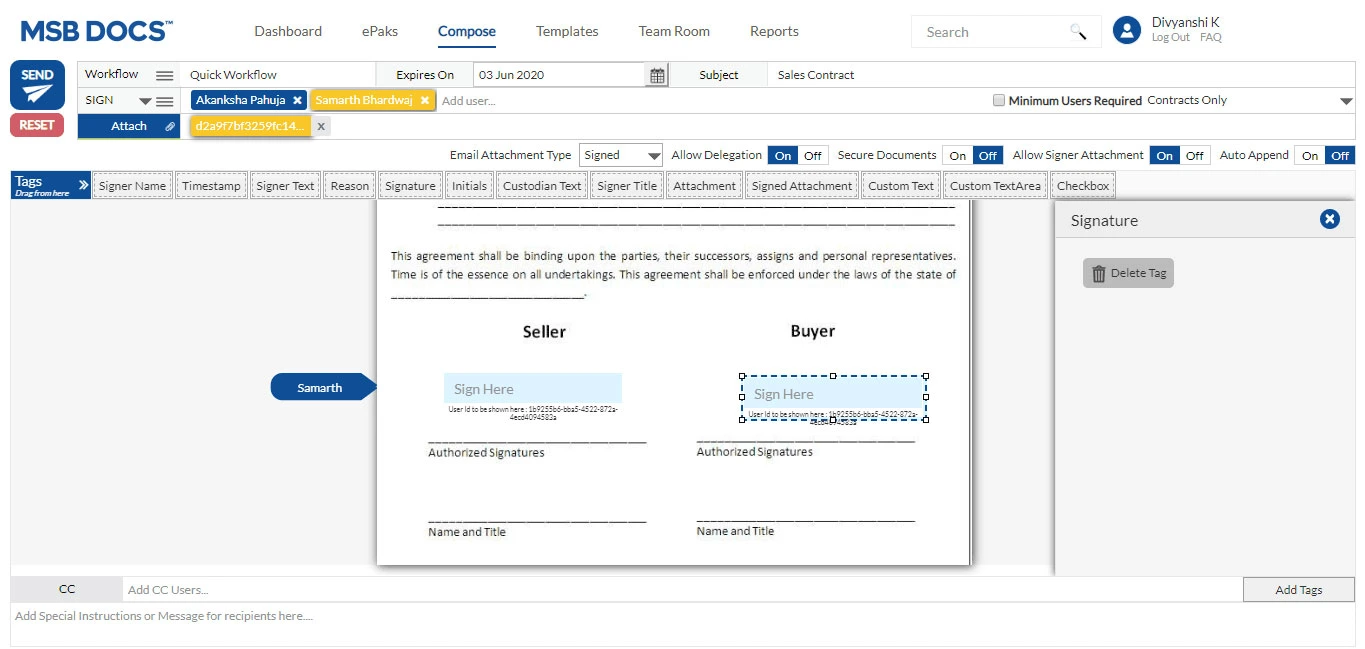
Step 2: Format document and drop signature tags

Take up the final formatting of the document and drop the signature tags as and where required. In addition to the signature tags, there are other useful tags too that you may include as per your requirements with easy drag and drop option.

tags

Step 3: Define the workflow and send

Just like while sending the email, you add the email ID’s of the concerned group of people. Here you can also add the email IDs of those you want to take actions on the sales contract.

workflow

Once the sales contract is sent by you, MSB Docs will automatically prompts the users to take actions such as sign or review the document. Your customers can sign the document by taking any of the following options:

  • Draw the signature using your finger or a stylus on the screen
  • Type in the signature and customize from a vast selection of font
  • Take a picture of a signature and upload it.

Sales contract is just an example that we have showcased in this blog post, you can do a lot more in MSB Docs platform to streamline your business processes. To explore more, book your demo now!